How to Activate Universal Account Number (UAN) Online – Complete Guide
The Universal Account Number (UAN) is a 12-digit unique identifier issued by the Employees’ Provident Fund Organisation (EPFO) in India. It helps employees consolidate their Provident Fund (PF) accounts from multiple employers. After UAN activation, EPFO allows members to access services such as PF balance checks, transfers, and other account-related facilities through its official portal.
At uanactivation.com, we publish educational content to explain the official EPFO UAN activation process through the EPFO Member Portal or UMANG app. Whether you're new to this or changing jobs, our content explains the official activation process in a clear and easy-to-understand manner.
Benefits of Activating Your UAN
- Real-Time Balance Check: Instantly view your PF balance and contributions from anywhere.
- Seamless Fund Transfers: Easily transfer PF savings when switching jobs.
- Online Claim Facilities: After successful activation, EPFO provides members access to online claim and withdrawal-related facilities through its official platforms.
- Digital Management: Handle your PF account via smartphone or computer—no office visits needed.
- Secure Access: Password and OTP verification ensure your data's safety.
What is a Universal Account Number (UAN)?
The UAN is a 12-digit unique number assigned by EPFO to EPF contributors. It links all your PF accounts across employers, simplifying management throughout your career.
Activation is essential for online services like balance checks, transfers, and withdrawals. It's like a digital key to your retirement savings!
Your UAN remains the same even with job changes. Activation involves linking Aadhaar, bank details, and employer KYC approval.
Eligibility Criteria for UAN Activation
- 1 Valid UAN: Provided by your employer—check payslip or HR.
- 2 Valid Aadhaar: 12-digit number linked to an active mobile for OTP.
- 3 Indian Employees: Contributing to EPF via EPFO-registered employers.
- 4 Official Channels: Use EPFO portal or UMANG app only.
- 5 No Age Limit: Any UAN holder can activate regardless of age.
Documents and Information Needed for UAN Activation
- UAN Number: 12-digit code from payslip or HR.
- Aadhaar Number: Linked to mobile for OTP.
- Registered Mobile: For receiving OTPs.
- Bank Details: Account number and IFSC for KYC.
- PAN (Optional): For additional services.
Step-by-Step Guide to Online UAN Activation
The official EPFO UAN activation process can be completed online through the EPFO Member Portal by following these steps. Follow these steps for a hassle-free process:
-
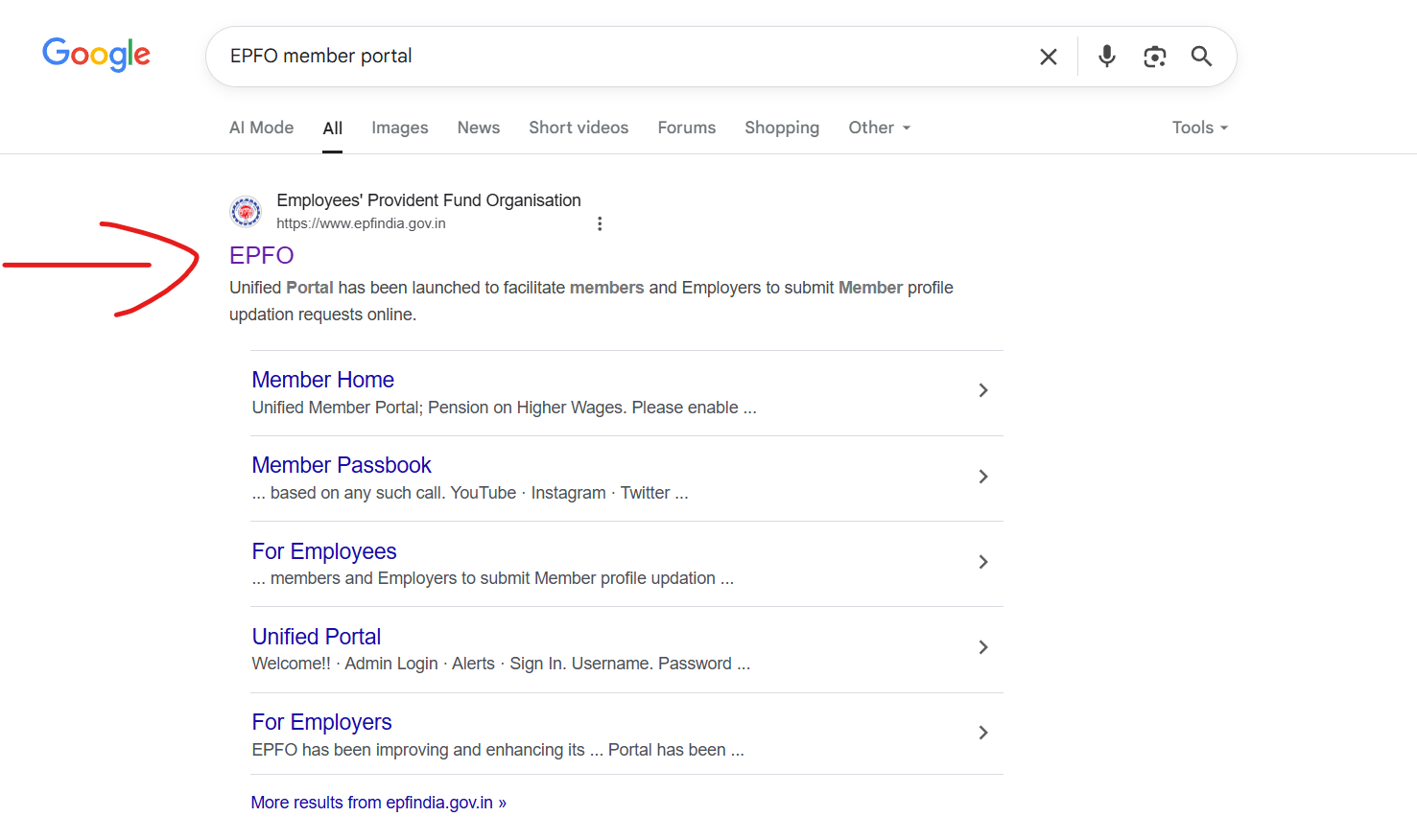
Search for EPFO Portal: Open your browser and search for "EPFO Member Portal" to visit the official site.
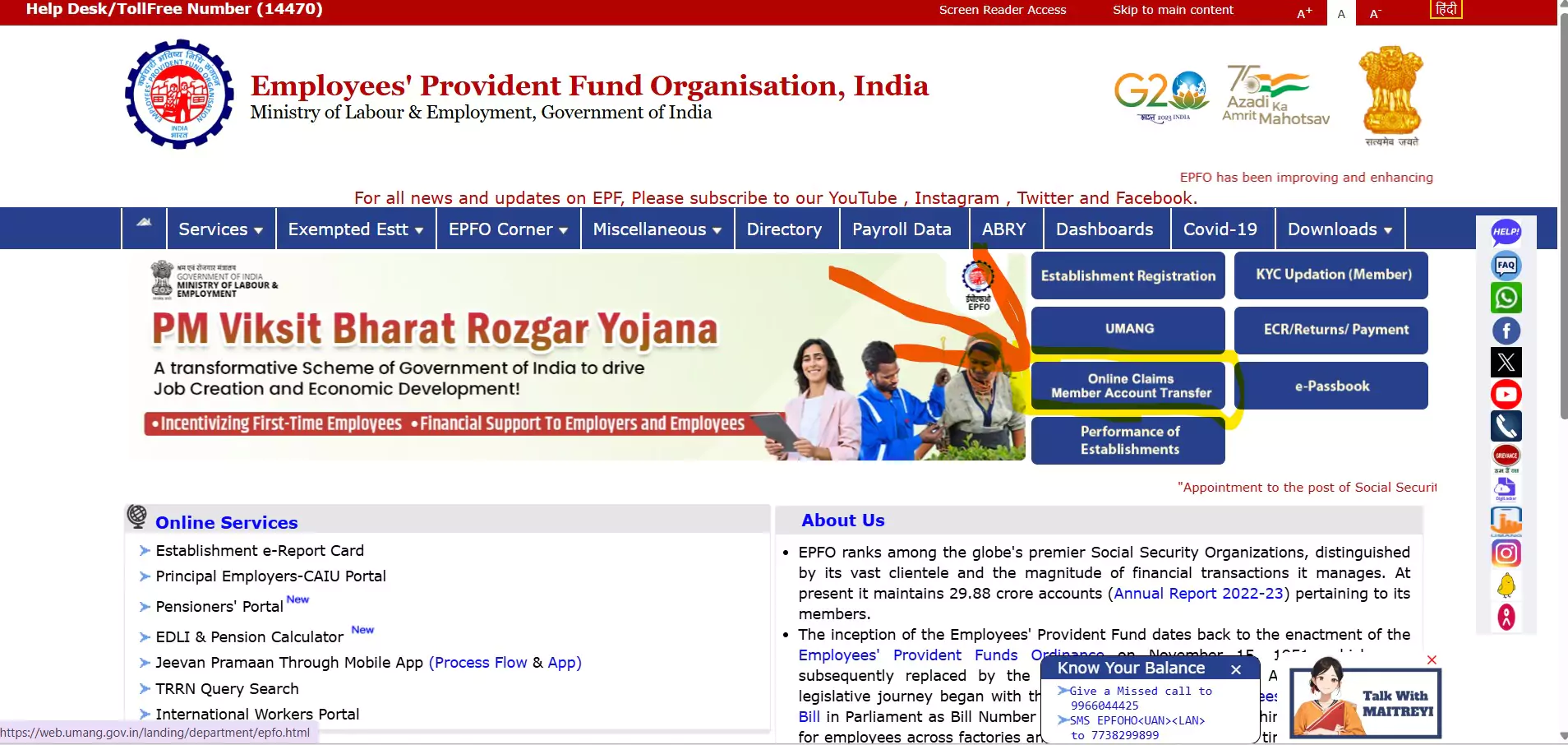
Navigate to EPFO Website: Go to www.epfindia.gov.in and click on "Online Claims Member Account Transfer" in the dashboard.
Access Unified Portal: Ensure you're on unifiedportal-mem.epfindia.gov.in for security.
-
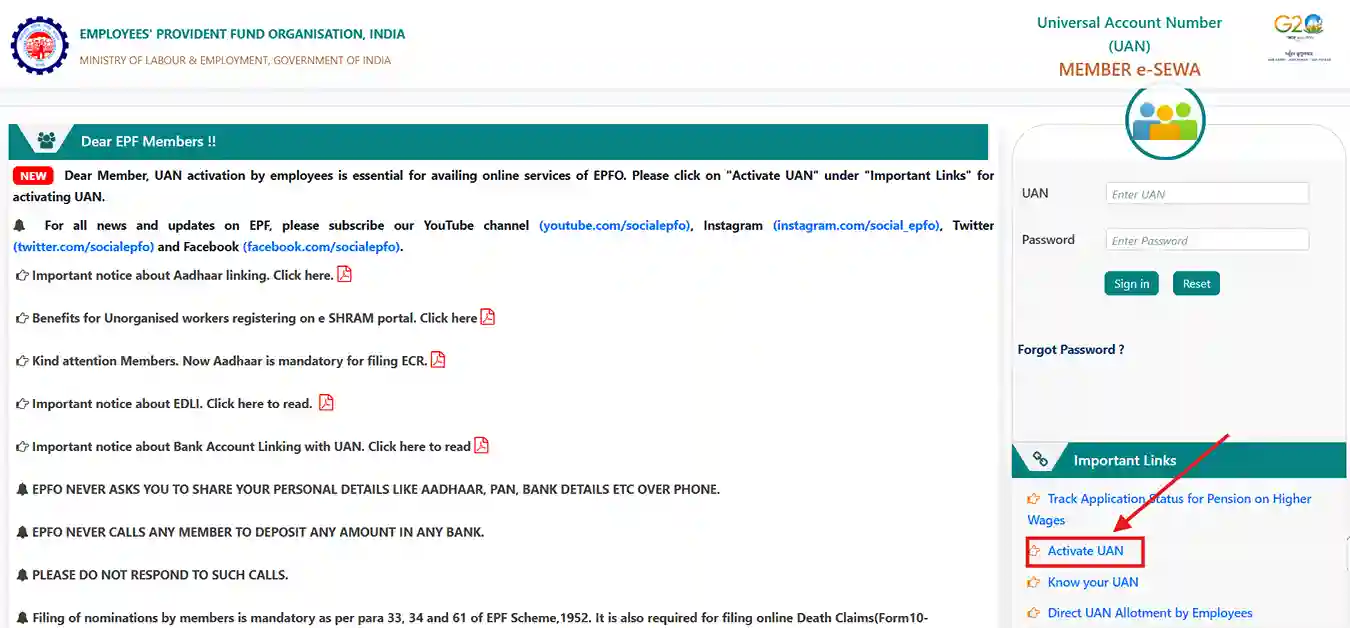
Locate Activate UAN: In the sidebar, click "Activate UAN" under Important Links.
-
Enter Details: Fill in UAN, Aadhaar, name, DOB, and mobile. Verify for accuracy.
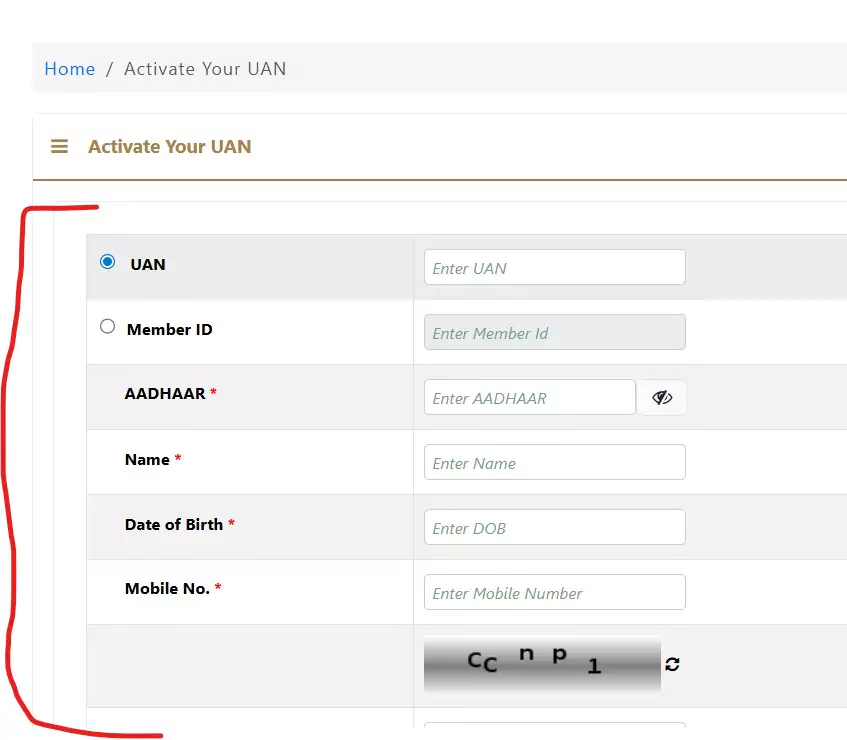
Complete captcha and accept disclaimer.
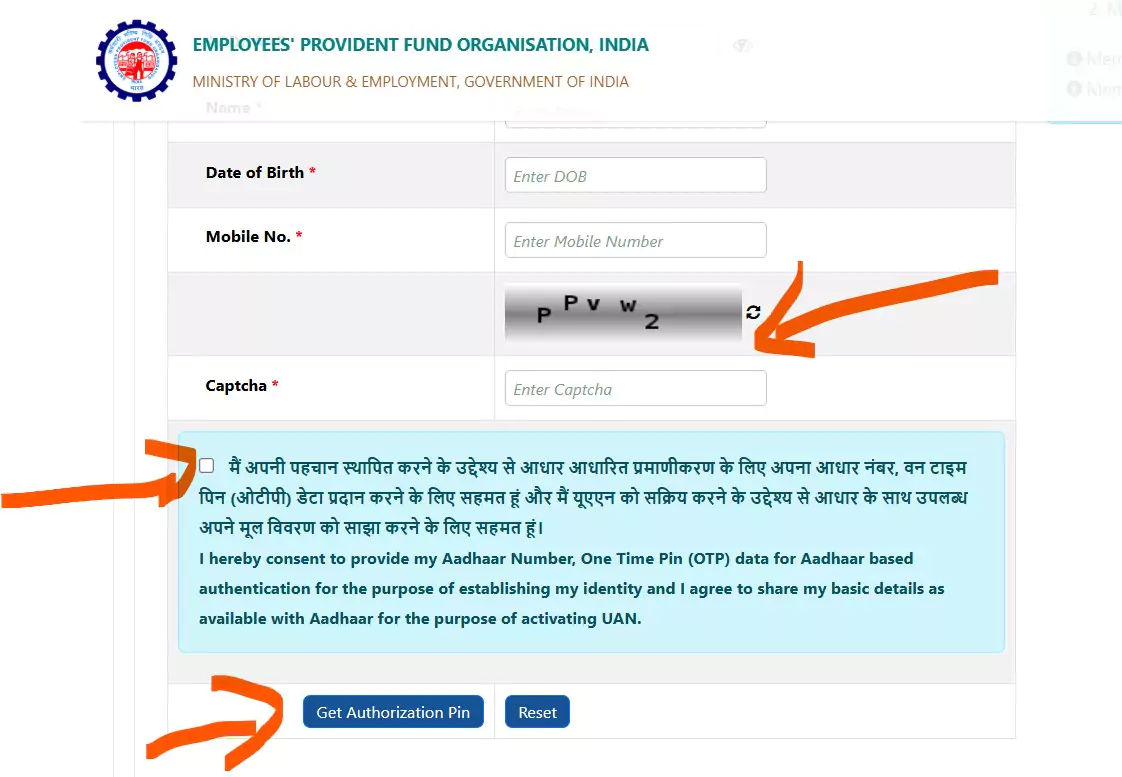
Request OTP: Click to receive OTP on your Aadhaar-linked mobile.
Verify OTP: Enter the 6-digit OTP. Resend if needed.
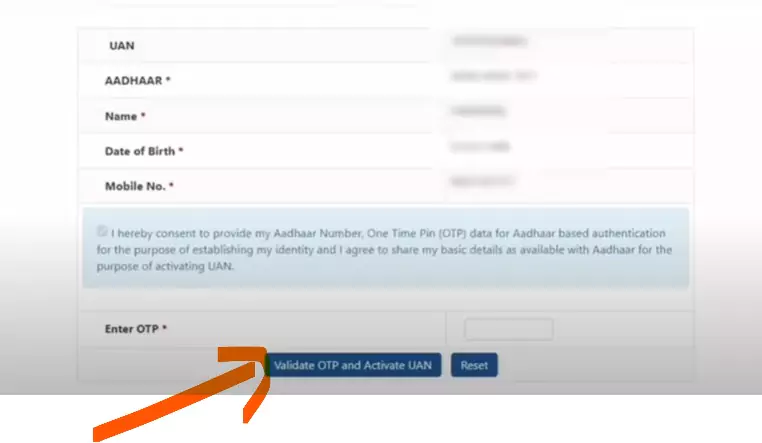
Receive Password: A temporary password will be sent via SMS—keep it secure.
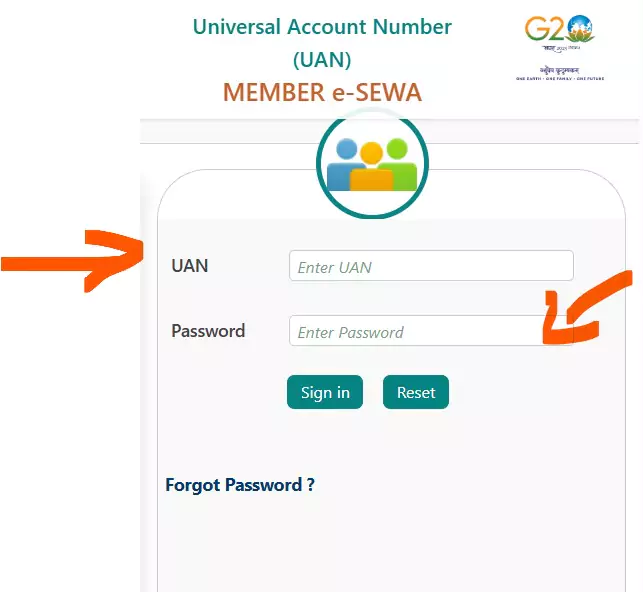
Log In: Use UAN and password on the portal homepage.
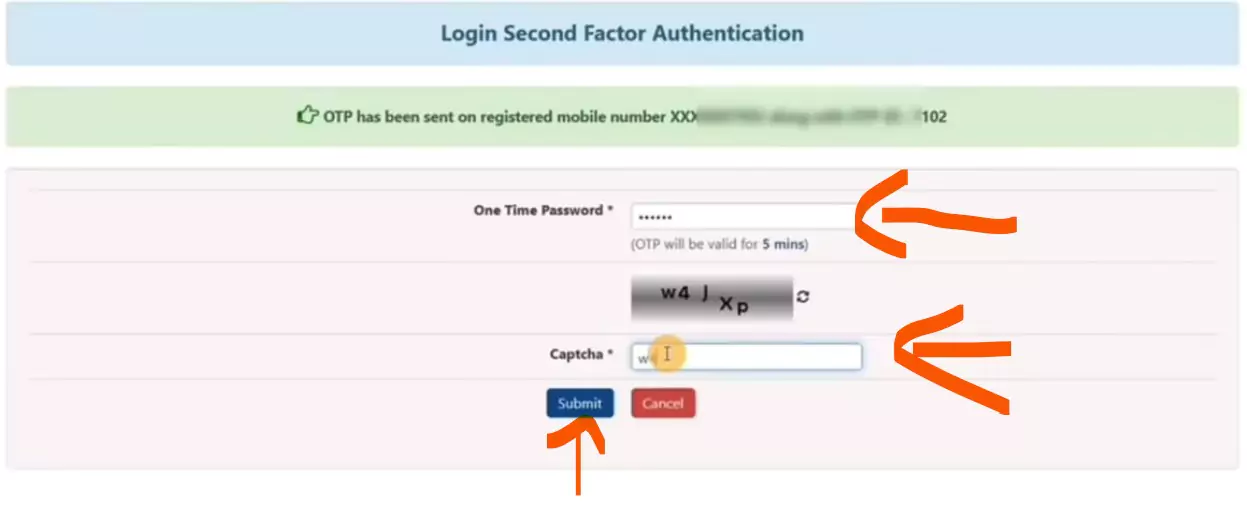
Post-Login OTP: Enter Aadhaar OTP and captcha.
Set New Password: Change the temporary password to a secure one.
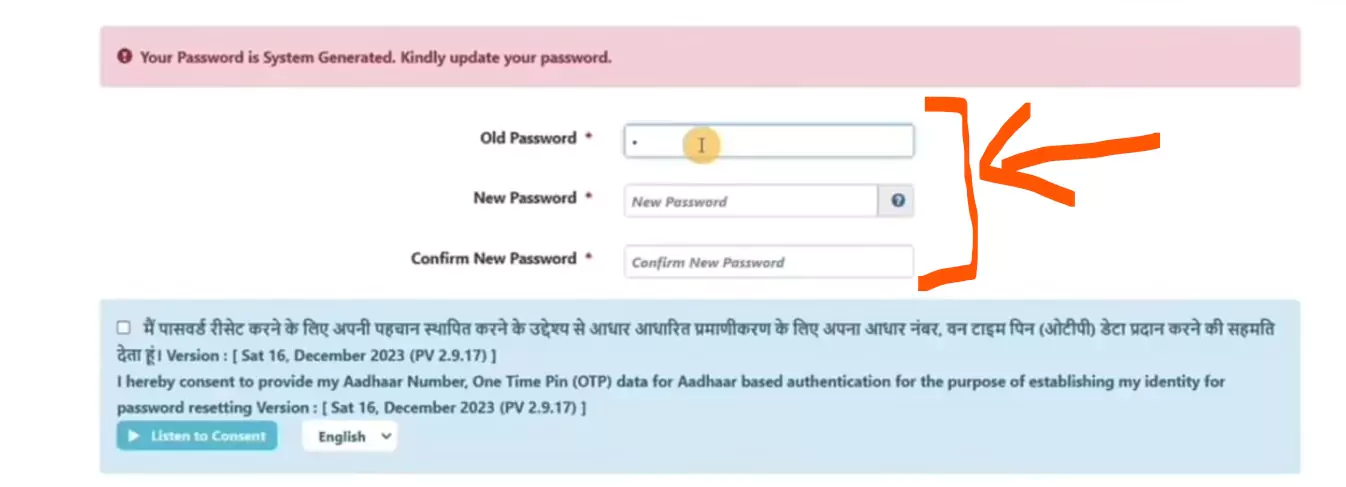
Confirm: Verify with Aadhaar OTP.
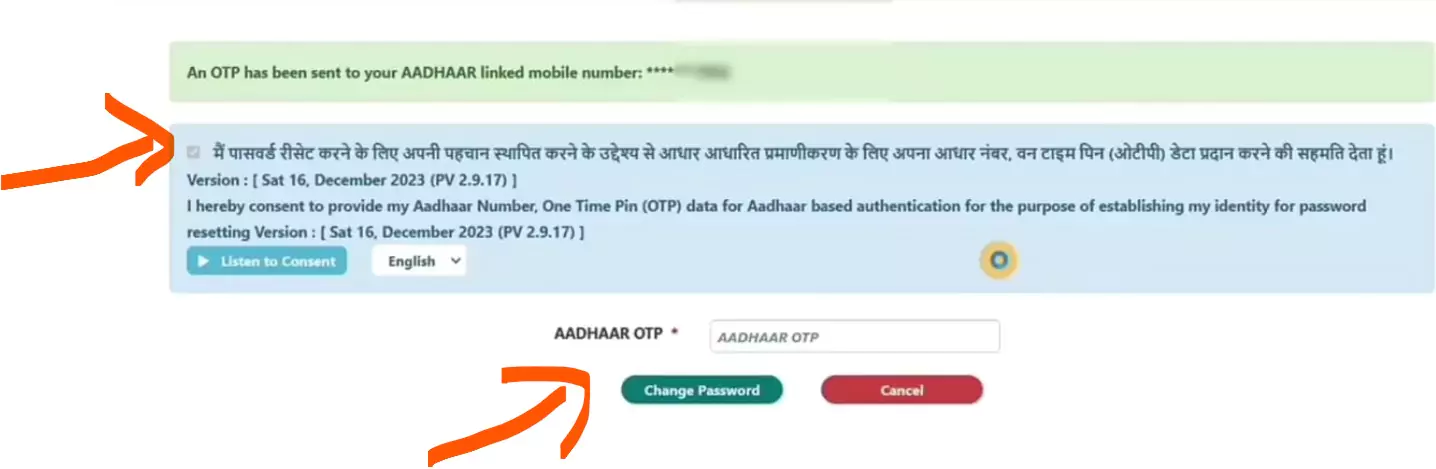
Success: Log in with new credentials to access services like PF balance checks and withdrawals.
Note: You've now activated your UAN! Use it for KYC updates, claims, and more.
Difference Between PF Management With and Without UAN Activation
| Feature | Without UAN Activation | With UAN Activation |
|---|---|---|
| PF Balance Check | You depend on your employer to know your PF balance. | You can instantly check your balance anytime through the EPFO portal or mobile app. |
| PF Transfer | When changing jobs, you need to fill out Form 13, which is a lengthy and manual process. | You can easily request a transfer online with just a few clicks. |
| PF Withdrawal | Withdrawals require paper forms, leading to delays and longer processing times. | Withdrawals can be claimed online, and funds are usually credited faster. |
| KYC Update | KYC updates are handled through the employer, which can be inconvenient. | You can directly update Aadhaar, PAN, and bank details online via the EPFO portal. |
Troubleshooting Common Issues
UAN Not Found: Verify with payslip/HR or use "Know Your UAN" on portal.
OTP Not Received: Confirm Aadhaar-mobile link; update at Seva Kendra if needed.
KYC Delay: Follow up with HR; contact EPFO at 1800-118-005.
Incorrect Details: Correct via "Manage > KYC" after login.
Conclusion
Activating your UAN empowers you to manage PF savings efficiently—free, secure, and convenient. Use our guide for the EPFO portal or UMANG app. Start today for a brighter financial future! Note: uanactivation.com does not provide any official EPFO service. This article is published for informational purposes only.
Frequently Asked Questions (FAQs)
A UAN is a 12-digit number that links together your PF accounts from various employers. Once activated, you can access online services and find out your PF balance, transfer funds or withdraw funds and be paperless and hassle-free in managing your PF accounts.
Check your payslip, as most employers include the UAN. Alternatively, ask your employer’s HR team or use the “Know Your UAN” option on the EPFO portal (unifiedportal-mem.epfindia.gov.in) with your Aadhaar or PF member ID.
Yes, Aadhaar is required to verify your identity via OTP during activation. Ensure your Aadhaar is linked to an active mobile number.
Check to see if you have linked your mobile number with your Aadhar. If not, change your mobile number at an Aadhar Seva Kendra. Check your phone's network or try after 10-15min. Contact EPFO helpline (1800-118-005) if issue persists
The activation process takes 5–10 minutes, but KYC approval by your employer may take 7–10 days. Follow up with your HR if it’s delayed.
No, UAN activation is completely free on the EPFO portal and UMANG app.
You can start the activation process, but full activation requires your employer to approve your KYC details. Contact your HR to expedite this step.